
 Official WhatsApp Business API
A bulk WhatsApp message sender that won’t get your number banned.
GetSetSales is a WhatsApp bulk message sender built on Meta’s official API. Upload your contact sheet, pick a template Meta has approved, and send bulk WhatsApp messages to thousands of customers who agreed to hear from you. You see who received, read and replied. No extensions, no blaster software, no monthly plan.
No card · First 100 messages free · Keep the WhatsApp Business app on your phone
Meta’s charge plus our ₹0.15 a message. Work out your own number
Why unofficial bulk WhatsApp senders get numbers banned
Most “bulk WhatsApp software” works by taking over WhatsApp Web or the app on your phone and typing messages faster than a person could. WhatsApp’s terms don’t allow that, and it is easy for WhatsApp to spot.
Chrome extensions and blasters
They automate a normal WhatsApp account. The pattern of hundreds of identical messages in minutes gets flagged, and the number that sent them is the one that is restricted or banned.
Messages to people who never asked
When strangers get your message, some press Block or Report. A handful of reports in a day is enough to put a number at risk, whatever tool you use.
Nobody to appeal to
If an unofficial tool gets your number banned, the seller can’t restore it. You lose the number your customers know, and every chat on it.
More detail: how to send bulk WhatsApp messages without getting banned.
How bulk WhatsApp messaging is meant to work
WhatsApp does allow businesses to message many customers at once. It just has to go through the WhatsApp Business API, with three rules.
- Approved templates. A message you send first has to be a template Meta has reviewed. You write it once, Meta approves it, and you can send it to any number of customers with their own name and details filled in. Browse ready-made WhatsApp message templates to start from.
- Opt-in. Send only to people who agreed to hear from you on WhatsApp: customers who gave their number at the counter, on a form or in a chat. How to collect WhatsApp opt-in.
- Daily limits that grow. A new account can message 250 different people a day. Verify your business and it rises to 2,000, then up to 10,000, 100,000 and unlimited as long as your messages don’t get blocked or reported. WhatsApp messaging limits explained.
Meta grades every number on how customers react to its messages. Keep your WhatsApp quality rating green and the limits keep climbing. Customer replies don’t count toward the limit at all.
Send bulk WhatsApp messages from a contact sheet
From your list to a sent campaign in GetSetSales. No developer needed.
Import your contacts
Upload an Excel or CSV file, or link a Google Sheet. Keep columns for name, number and anything you want in the message, like an amount or a date. Tag contacts so you can send to a group later.
Pick an approved template
Choose one of your approved templates, or write a new one and send it to Meta for review from inside GetSetSales. Images, buttons and carousels all work.
Fill the variables
Match each blank in the template to a column in your sheet, so every customer gets their own name, order number or due date. Preview it exactly as they will see it.
Send now or schedule
Press send, or pick a date and time. Large sends are paced to stay inside your number’s limits, and anyone who asked you to stop is left out automatically.
See delivered, read and replied
Live counts for the campaign and the status of each customer. Failed messages are grouped by reason and are not charged.
Answer the replies
Replies land in the shared team inbox, or an automation picks them up. Your replies inside the 24-hour chat window cost nothing extra from us, and Meta gives each number 1,000 free replies a month.
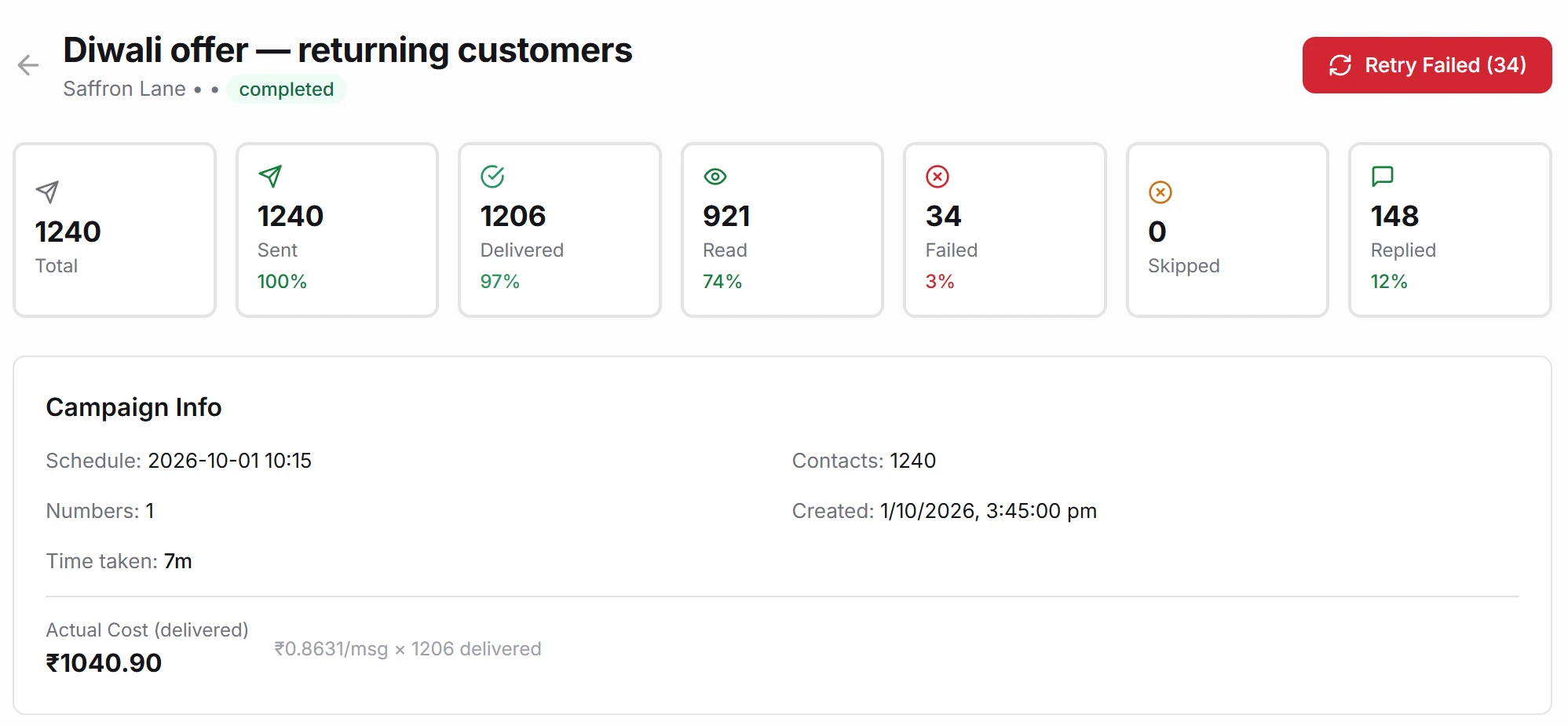
What 1,000 bulk WhatsApp messages actually cost
Two charges per delivered template message: Meta’s own charge, which Meta bills to you directly, and our ₹0.15. We add no markup to Meta’s rate.
| Per 1,000 delivered | Marketing | Utility |
|---|---|---|
| Meta’s charge (India) | ₹863.10 | ₹115 |
| GetSetSales (₹0.15 each) | ₹150 | ₹150 |
| Total | ₹1,013.10 | ₹265 |
Meta’s India rates from 1 October 2026, at the time of writing (marketing ₹0.8631, utility ₹0.115 a message), before any tax. Meta changes its rates; see the WhatsApp Business API pricing guide for the latest.
Marketing is offers, sales, festive greetings and anything meant to sell. Utility is about something the customer already has with you: a payment reminder, an appointment, an order update. Messages that fail to deliver cost nothing. Put your own numbers into the WhatsApp pricing calculator to see a month’s bill.
The honest answer on free bulk WhatsApp senders
A lot of people search for a WhatsApp bulk message sender free of cost. This is how it really works.
- Truly free tools risk the number. Free senders and extensions run on WhatsApp Web, the same automation that gets numbers banned. The tool is free; losing the number your customers know is not.
- The official API always has Meta’s charge. Every provider passes on Meta’s per-message rate for templates. Anyone advertising free unlimited official messages is leaving something out.
- Start free with GetSetSales. Your first 100 template messages, automation runs or answered chats are free from us, with no card. After that there is no monthly fee: you top up a wallet and pay ₹0.15 a message. More on what is free on the WhatsApp API.
- Small lists can use the app. If you only need to reach a few people, the free WhatsApp Business app has broadcast lists of up to 256 contacts. Only people who saved your number receive them.
Bulk WhatsApp from Excel or a Google Sheet
Your customer list probably lives in a spreadsheet already. Use it as it is.
Upload Excel or CSV
One row per customer. Extra columns become details you can drop into the message.
Import a Google Sheet
Bring contacts in straight from a sheet, so the list your team keeps up to date is the list you send to.
Tag once, send again
Imported contacts are saved with tags. Next month, send to “fees due” or “Diwali buyers” without uploading anything.
Your first campaign the same day
Create your free account
No card. Your name, email and WhatsApp number.
Connect your number
Through Meta’s own sign-up window, with your Facebook login. You can keep the WhatsApp Business app on your phone. See the steps.
Import and send
Upload your sheet, pick an approved template and send. The first 100 are free.
Bulk WhatsApp sender questions
How can I send bulk WhatsApp messages without getting banned?
Use the official WhatsApp Business API instead of an extension or blaster, send only Meta-approved templates, message only people who opted in, and grow your volume steadily within your daily limit. Give people an easy way to stop. Read the full guide on sending bulk WhatsApp without a ban.
Is there a free WhatsApp bulk message sender?
Free senders exist, but they automate WhatsApp Web and put your number at risk of a ban. On the official API, Meta charges for every template message, whichever provider you use. GetSetSales gives you the first 100 messages free with no card, and has no monthly fee after that.
How many bulk WhatsApp messages can I send in a day?
A new account can start conversations with 250 different people a day. Business verification lifts that to 2,000, and it then grows by itself to 10,000, 100,000 and unlimited as long as your quality stays good. Replies to customers who wrote to you don’t count. See WhatsApp messaging limits.
Is bulk WhatsApp marketing legal in India?
Sending through the official API to customers who agreed to hear from you is allowed by WhatsApp. Using unofficial software breaks WhatsApp’s terms. Keep a record of how each customer opted in and stop messaging anyone who asks.
Can I send bulk WhatsApp messages from Excel?
Yes. Upload an Excel or CSV file, or import a Google Sheet, match the columns to the blanks in your template, and send or schedule the campaign.
Can I send images and buttons in a bulk message?
Yes. Templates can have an image at the top and buttons below the text. Marketing templates can also be carousels of up to 10 cards.
Do I need a new number for bulk WhatsApp?
No. You can connect the number you already use and keep the WhatsApp Business app on your phone. Chats from the app and from GetSetSales stay in step.