
 Official WhatsApp Business API
WhatsApp broadcast: one message, many customers.
A WhatsApp broadcast sends the same message to many people at once, and each person gets it as a normal one-to-one chat, not in a group. The free broadcast list in the WhatsApp Business app reaches up to 256 people, and only those who saved your number. To send to your whole customer list, with their name in the message, a set time and a report of who read it, you broadcast through the WhatsApp Business API.
No card · First 100 messages free · Keep the WhatsApp Business app on your phone
Plus Meta’s own charge per template, billed by Meta. Work out your cost
How a broadcast list works
A broadcast list is a saved group of contacts you message together. It is free and built into WhatsApp and the WhatsApp Business app.
- Up to 256 contacts per list. You can make as many lists as you like, but each one holds 256 people at most.
- Only people who saved your number get it. If a customer has not saved your number in their phone’s address book, the message is simply not delivered to them, and you are not told.
- It arrives as a personal chat. Each person sees the message in their own chat with you. They cannot see who else got it.
- Replies come back privately. When someone replies, it lands in your one-to-one chat with them, not in front of the whole list.
How to make a broadcast list
WhatsApp has renamed the option to Business broadcast in the WhatsApp Business app, and the menu names change between app versions, so yours may look slightly different. Steps below are from WhatsApp’s help centre, checked November 2026.
WhatsApp Business on Android
- Open Chats, tap the three dots at the top and choose Business broadcast (or go to Tools > Business broadcast).
- Tap the new list icon and pick the contacts you want, up to 256.
- Tap the tick to save the list. Open it, type your message and send.
WhatsApp Business on iPhone
- Go to Tools > Business broadcasts (or Settings > Business broadcast) and tap the plus icon.
- Search for or select the contacts to add.
- Tap Create, then write and send your message.
Regular WhatsApp on Android: Chats > three dots > Broadcast lists, pick contacts, tap the tick. Lists can only be made on the phone, not on WhatsApp Web or the desktop app.
In some countries Meta is also trying out paid “business broadcasts” inside the Business app, which can reach customers who did not save your number. It is not available to every business yet, and it still runs from one phone.
Six limits that push businesses to the API
A broadcast list is fine for 50 regulars. Once your customer list is in the hundreds or thousands, these start to hurt.
256 people per list
A list of 2,000 customers means eight lists, made one contact at a time, and eight sends every time you have news.
The saved-number rule
Walk-in customers and new leads rarely save your number. They never see your broadcast, and the app does not tell you who missed it.
No scheduling
A free list sends the moment you tap send. Want the offer to go at 10 am on Sunday? You have to be holding the phone at 10 am on Sunday.
No results
The free list does not give you one view of who got it, who read it and who replied. You find out by scrolling through chats.
No personalisation
Everyone gets exactly the same words. You cannot put the customer’s name, their due date or their order in the message.
One phone
The broadcast lives on one phone. When 200 people reply, one person on one phone answers them all.
Some businesses try bulk sender software or Chrome extensions to get past these limits. Those tools automate WhatsApp Web and get numbers banned. Read how to send bulk WhatsApp without a ban.
Broadcast to your whole list with GetSetSales
On the official WhatsApp Business API, a broadcast is called a campaign. You pick an approved template and a list of customers who agreed to hear from you, and GetSetSales sends it.
An approved template
Every broadcast uses a message template Meta has approved. Start from our free template library and submit it from inside the app.
Any size list
Upload an Excel or CSV file, connect a Google Sheet or pick a tag. No 256 cap and no saved-number rule. The only ceiling is your number’s daily messaging limit, which rises as you send well.
Their name in the message
“Hi Priya” instead of “Hi”. Fill names, dates, amounts or order numbers from your sheet into the template.
Scheduling
Write it tonight, set it for 10 am tomorrow. Sending speed follows your number’s tier so you stay inside Meta’s limits.
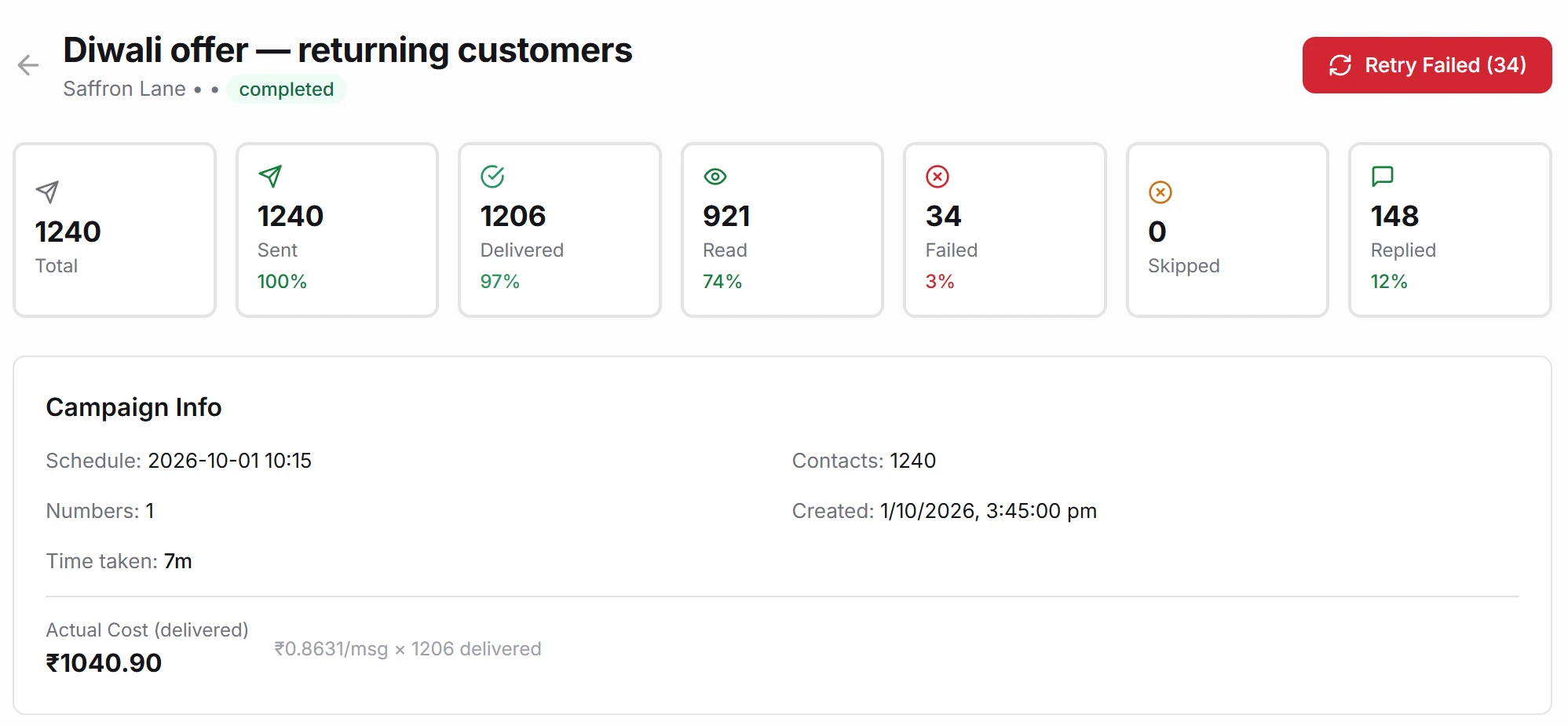
Delivered, read, replied
One screen shows how many messages were delivered, read and replied to, and who did each.
Buttons and a team inbox
Add quick-reply or link buttons and an image. Replies land in the shared inbox, so your whole team can answer, and a bot can handle common questions.
You can keep using the WhatsApp Business app on your phone with the same number. More on campaigns · Bulk WhatsApp sender, the official way
Six broadcasts you can adapt
{{1}}, {{2}} are the parts filled in from your sheet for each customer. The category decides what Meta charges: utility messages cost far less than marketing ones.
| Type | Category | Message |
|---|---|---|
| Offer | Marketing | Hi {{1}}, this weekend only: 20% off all kurtas at our {{2}} store. Show this message at the counter. Offer ends Sunday 9 pm. |
| New stock | Marketing | Hi {{1}}, the new winter collection has arrived. Tap below to see the photos, or reply with a design number to keep one aside for you. |
| Appointment reminder | Utility | Hi {{1}}, a reminder of your appointment at {{2}} on {{3}}. Reply 1 to confirm or 2 to change the time. |
| Payment reminder | Utility | Hi {{1}}, the payment of ₹{{2}} for {{3}} is due on {{4}}. You can pay here: {{5}}. Thank you. |
| Event | Marketing | Hi {{1}}, we are holding a free parents’ workshop on {{2}} at {{3}}. Seats are limited. Reply YES to book yours. |
| Festival | Marketing | Happy Diwali {{1}}! Thank you for shopping with us this year. Your festive gift: ₹200 off your next bill till {{2}}. |
A reminder is utility only when it is about something the customer already booked or owes. Add an offer to it and Meta treats it as marketing. More examples by business type: WhatsApp message templates. Check yours before you submit with the template checker.
What a broadcast costs
Broadcast lists in the app are free. Through the API you pay two small charges per message delivered.
| Per message delivered | Marketing | Utility |
|---|---|---|
| Meta’s charge (India) | ₹0.8631 | ₹0.115 |
| GetSetSales fee | ₹0.15 | ₹0.15 |
| Total | about ₹1.01 | about ₹0.27 |
| A broadcast to 1,000 people | about ₹1,013 | about ₹265 |
Meta’s rates are from 1 October 2026, at the time of writing; Meta bills you directly with no markup from us. Messages customers send you are free; Meta gives each number 1,000 free replies a month inside open chats, then charges per reply. No monthly subscription, and the first 100 messages are free. Put in your own numbers on the WhatsApp pricing calculator, or read WhatsApp API pricing in India.
Broadcast vs group vs community
| Broadcast | Group | Community | |
|---|---|---|---|
| How it arrives | Private chat for each person | One shared chat | Announcement group plus linked groups |
| Can members see each other? | No | Yes, names and numbers | In the groups they join |
| Replies | Only to you | To everyone | Admins post announcements; chat in groups |
| Best for | Offers, reminders, updates to customers | Small teams, friends, a class | A school, society or club with sub-groups |
For customers, a broadcast is usually the right choice: nobody’s number is shown to strangers, and nobody gets a flood of other people’s replies.
Your first API broadcast today
Create your free account
No card. Your name, email and WhatsApp number.
Connect your number
Through Meta’s own sign-up window, keeping the app on your phone. See the steps.
Upload, pick a template, send
Import customers who agreed to hear from you, choose an approved template and send now or schedule it.
WhatsApp broadcast questions
What is a WhatsApp broadcast message?
One message sent to many people at once, where each person receives it as a private chat with you. Unlike a group, recipients cannot see each other or each other’s replies.
How many contacts can I add to a WhatsApp broadcast list?
Up to 256 contacts per list in WhatsApp and the WhatsApp Business app. You can make as many lists as you want. Through the WhatsApp Business API there is no list size cap; what limits you is your number’s daily limit of new customers you can message, which starts at 250 and rises with good sending. See WhatsApp messaging limits.
Why are some people not getting my broadcast message?
In the app, a broadcast only reaches people who have saved your number in their phone’s address book. Anyone who hasn’t will not get it. API broadcasts do not have this rule, as long as the customer agreed to receive messages from you.
Can I send a WhatsApp broadcast without saving numbers?
Yes, through the WhatsApp Business API. You upload a sheet of numbers and send an approved template; neither you nor the customer needs to save the other’s number. You do need the customer’s permission to message them: read how to collect WhatsApp opt-in.
Can I schedule a WhatsApp broadcast?
A free broadcast list in the app sends straight away. With GetSetSales you set the date and time when you create the campaign, and it goes out then.
Is a WhatsApp broadcast free?
Broadcast lists in the app are free. Broadcasts through the API cost Meta’s per-message charge plus our ₹0.15 per message delivered, with no monthly plan and the first 100 messages free. Use the pricing calculator to see your total.
Will broadcasting get my number banned?
Not if you broadcast the official way: approved templates, to customers who opted in, within your daily limit. Numbers get banned when people use unofficial bulk senders or send to strangers who block and report them. See how to send bulk WhatsApp messages without getting banned.