
 Official WhatsApp Business API
A WhatsApp CRM on the number you already use.
Every customer who messages you becomes a contact with their chats, tags and notes in one place. Send bulk campaigns to the people who opted in, let a bot answer the common questions, follow up with leads who go quiet, and share it all with your team.
No card · First 100 messages free · Keep the WhatsApp Business app on your phone
Plus Meta’s own charge on campaign templates, billed by Meta at its published rate. Full pricing
Your customer list, built from your chats
A spreadsheet of numbers and a phone full of chats are two halves of the same thing. GetSetSales keeps them together.
Contacts that fill themselves in
Anyone who messages your number is saved as a contact with the whole conversation. Import the rest from a spreadsheet.
Tags and notes
Tag customers by interest, stage or branch, by hand or from a bot answer, and leave notes the whole team can read.
Owners and tickets
Assign a chat to a person, open a ticket when something needs fixing, and see which customers are still waiting for a reply.
Broadcast to a list without risking your number
Campaigns go out through the official API with Meta-approved templates, to customers who agreed to hear from you. No unofficial tools, no ban risk from WhatsApp Web automation.
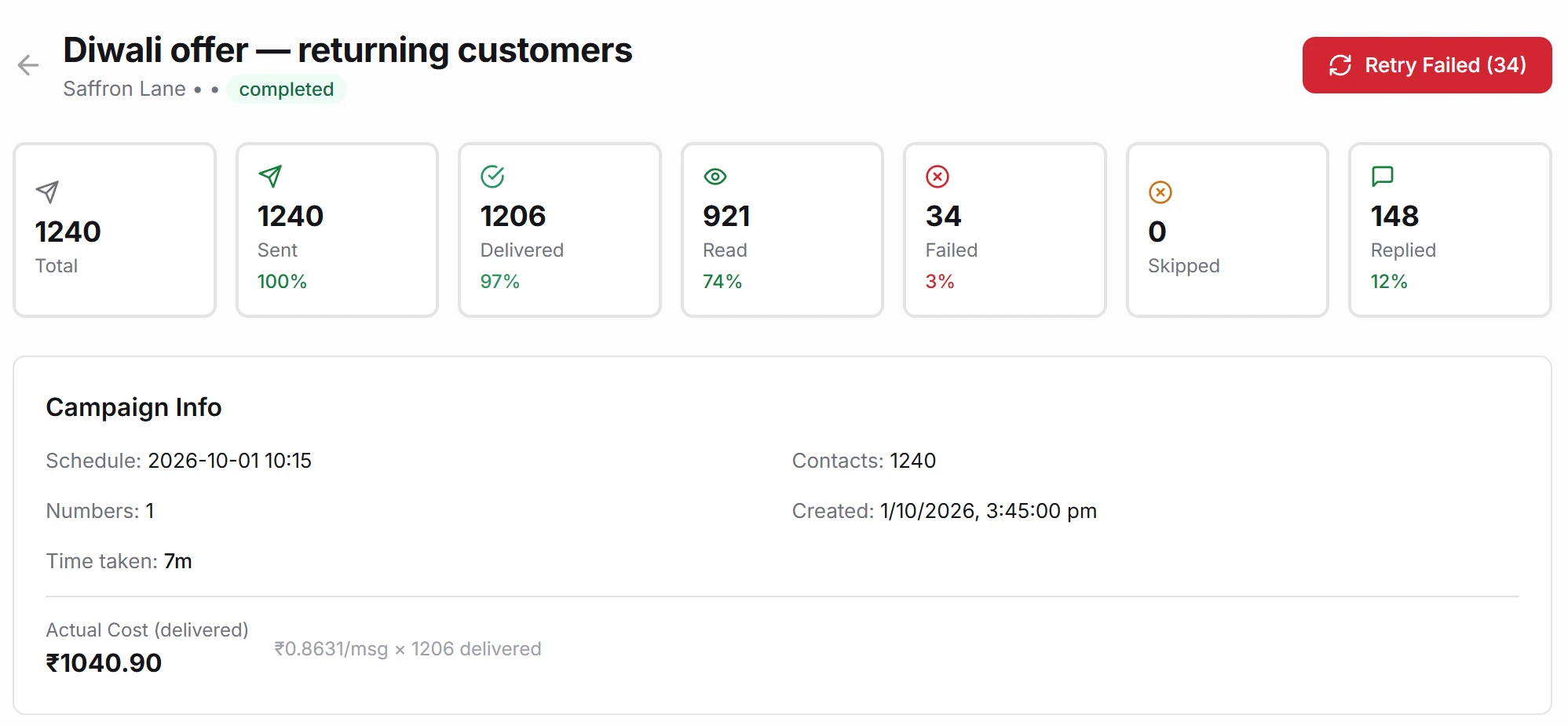
Send to a tag or a sheet
Pick a tag, or upload a spreadsheet with names filled in. Images, buttons and carousels all work.
Schedule it
Write tonight, send at 10 tomorrow morning. Sending speed follows your number’s limits, so you do not trip them.
See who read and replied
Delivered, read and replied for every message. Replies land straight in the shared inbox.
Answers and follow-ups while you are busy
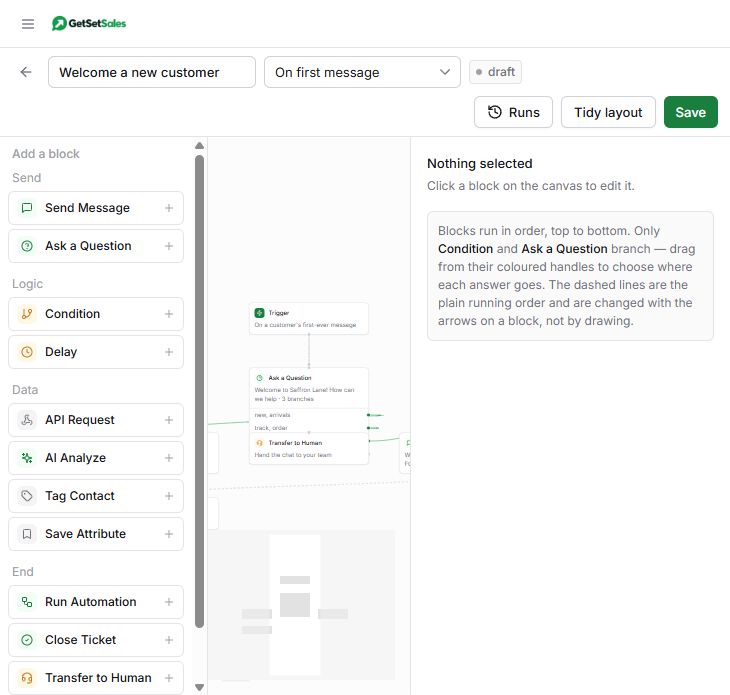
Bots you build by dragging blocks
Ask questions, show buttons and lists, save the answers to the contact, and hand over to a person when needed.
Follow-ups that stop on a reply
Send a set of messages over days to a new lead. The moment they reply, the sequence stops and a person takes over.
Bookings and payments in the chat
Book appointments and take payments through Razorpay or PayU without the customer leaving WhatsApp.
More on automation · More on the shared inbox · More on campaigns
What to check before you pick one
| Question | GetSetSales |
|---|---|
| Is it the official WhatsApp Business API? | Yes. We are a Meta Tech Provider. |
| Can I keep my current number and the app on my phone? | Yes, through WhatsApp coexistence. |
| Is there a monthly plan? | No. You top up a wallet and pay ₹0.15 per message delivered. |
| Are there limits on users or automations? | 3 team seats included. No cap on automations; each run is ₹0.15. |
| Where is the data kept? | In India (AWS Mumbai). |
| Can it connect to my other tools? | Google Sheets, Razorpay and PayU built in, plus a public API. |
Comparing with a tool you use now? See WATI, AiSensy, Interakt, Gallabox and DoubleTick side by side, or work out your own month on the calculator.
Running the same day
Create your free account
No card. Your name, email and WhatsApp number.
Import contacts and send
Upload your list, pick an approved template and send. Video tutorials cover every step.
WhatsApp CRM questions
What is a WhatsApp CRM?
Software that keeps your customers, their WhatsApp chats and your follow-ups in one place. Instead of chats scattered across one phone, every customer is a contact with their history, tags, notes and an owner, and your team can message them from one shared inbox.
Can I send bulk WhatsApp messages with it?
Yes, as campaigns through the official WhatsApp Business API. Each campaign uses a template Meta has approved and goes to customers who agreed to hear from you. That is what keeps your number safe; tools that blast messages through WhatsApp Web can get numbers banned. Read how to send bulk WhatsApp messages without getting banned.
Do I need a new number?
No. You can connect the number you already use and keep the WhatsApp Business app on your phone. Chats from the app and from GetSetSales stay in step.
How much does it cost?
There is no monthly subscription. You pay ₹0.15 for each message delivered, each automation run and each customer conversation a bot answers; your own replies in an open chat are free. Meta charges separately for campaign templates at its published rate. The first 100 messages are free.
Does it work with my CRM or Google Sheets?
Google Sheets, Razorpay and PayU connect without Zapier. A public API lets you send messages and update contacts from any other system.
Is my customer data safe?
Data is stored in India, on the official API, and each team member signs in with their own account and role. See the privacy policy for details.