
Answer the routine questions automatically. Hand over the rest.
“Where is my order?” “What are your timings?” “How much is it?” Build the conversation once, and every customer gets an answer in seconds — at two in the afternoon or two in the morning.
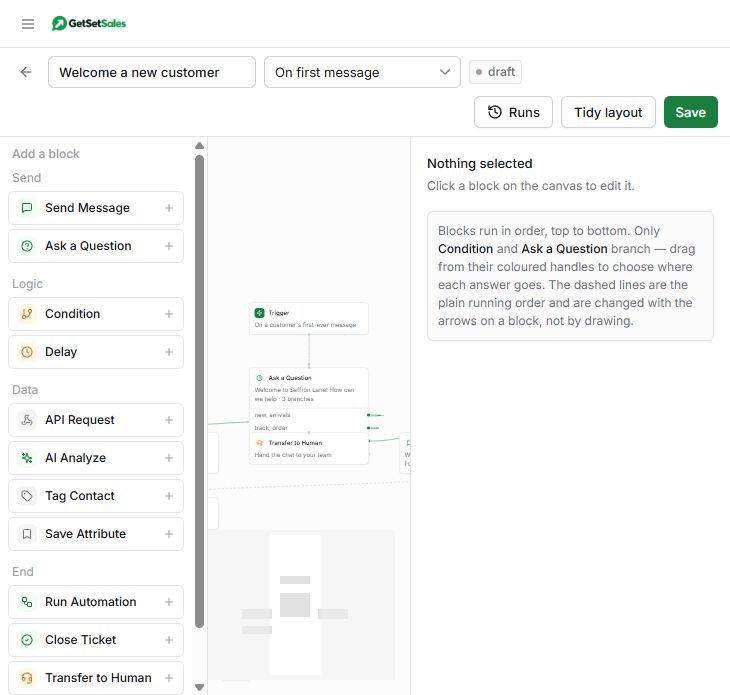
If you can draw it, you can build it
Drag blocks onto the canvas and join them up. There is no code, and nothing to install.
Send and ask
Send a message, a photo or a document. Ask a question with buttons the customer can tap, and wait for the answer.
Book a meeting
Offer your free times in the chat and book the one the customer taps, with reminders after. Part of the Meetings add-on.
Branch on the answer
Take the conversation a different way depending on what the customer says — or on what you already know about them.
Remember what you learned
Tag the contact and save their answers — city, order number, what they are interested in — to use in your next campaign.
Hand over to a person
When a customer asks for a human, or the question is not routine, the chat is flagged in the shared inbox for your team.
Wait, then follow up
Pause for an hour or a day, and nudge a customer who went quiet — without anyone having to remember.
Call your own system
Look up an order or push a lead into your CRM mid-conversation with the API block, and use the answer in the next message.
Understand the message with AI
Add an AI step and the automation reads what the customer actually wrote, in Hindi, English or a mix, instead of waiting for an exact keyword. It fills in what you ask for — what they need, an order number, how urgent it is — and the next block branches on it. If the AI cannot tell, the conversation takes your fallback path, usually a handover to a person.
Runs on the optional AI add-on, about ₹0.20 a step, or on your own AI key. See what it costs
Start from one that already works
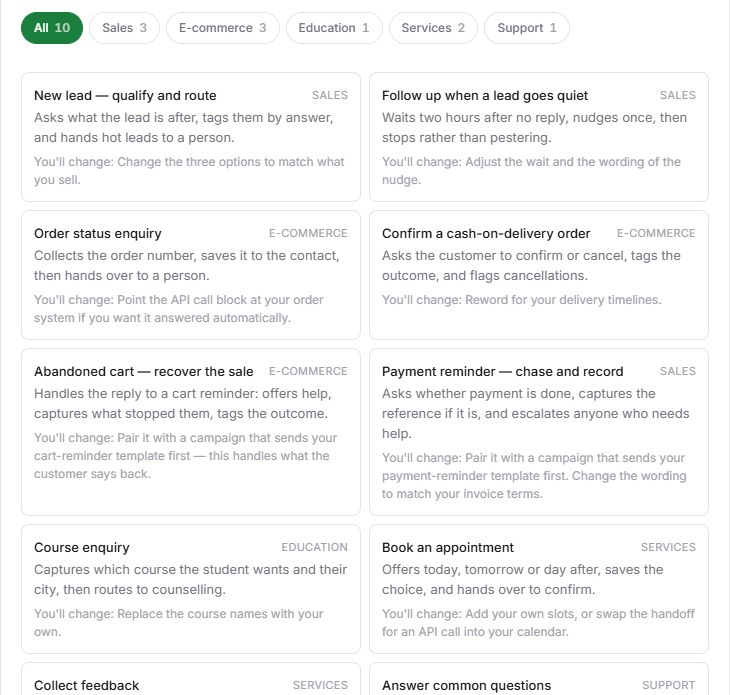
You do not have to begin with an empty canvas. Pick a ready-made automation, change the wording to match your business, and set it live.
Starts itself, on your terms
Each automation chooses when it runs, and you can pause it or set it live with one click.
- On a keyword — a customer sends “SHOP”, “ORDER” or anything you choose.
- On a first message — greet and route somebody who has never written before.
- On any message — a catch-all for when the shop is closed.
- On a message from your ad — anyone who taps your Click-to-WhatsApp ad, whatever they type.
- On a payment — Razorpay or PayU tells GetSetSales a payment went through or failed.
Your answers, sent the moment someone asks
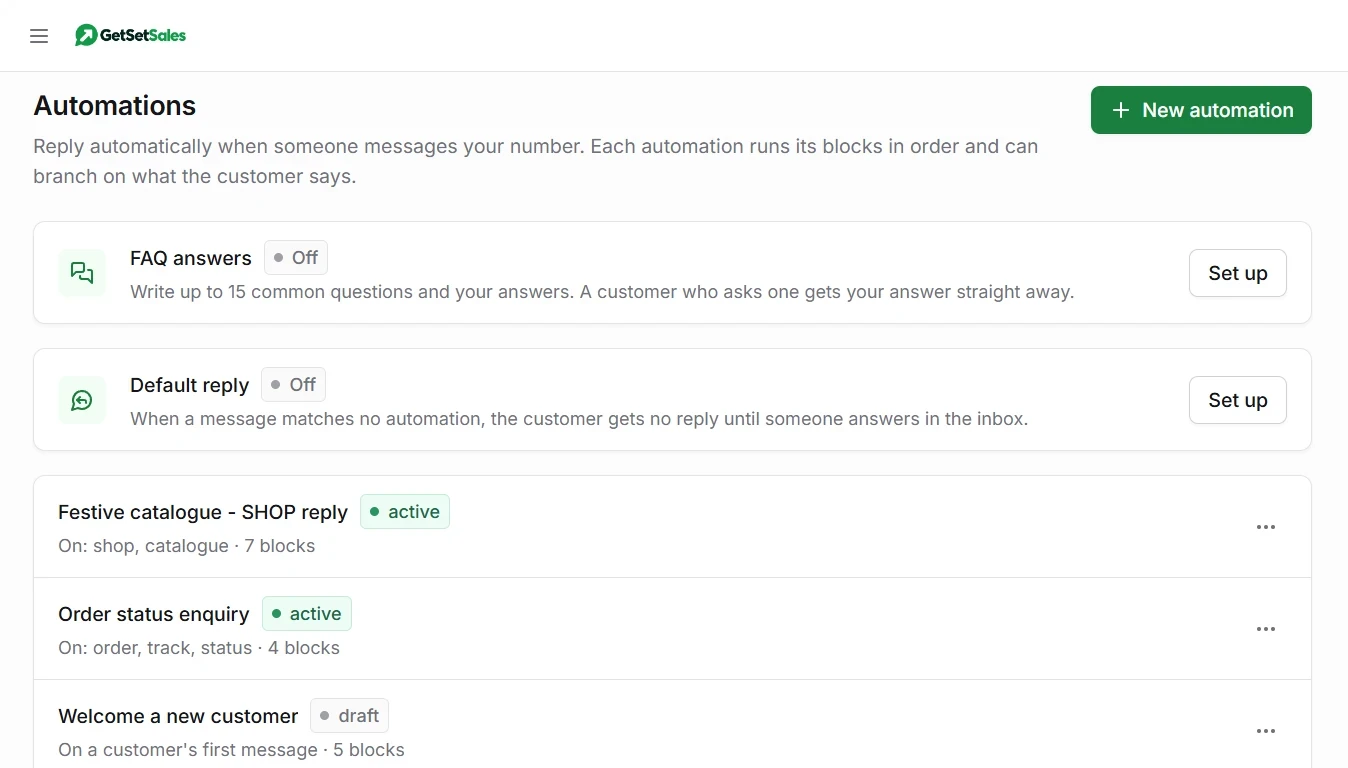
Write your common questions once, with your answer to each. When a customer asks one, in their own words, they get your answer straight away — no builder needed.
- Your words, not the AI’s — AI only works out which question is being asked. The reply is your answer, word for word, so it never invents a price or a promise.
- Understands how people really write — “fees kitni hai?” and “what does it cost?” both find your fees answer. Hindi, English, or a mix of the two.
- Stays quiet when it is not sure — if no question fits, nothing is sent from your FAQ and the chat waits for your team.
- Up to 15 questions, set up in minutes — and you can try a customer message before you switch it on.
FAQ answers run on the optional AI add-on, or on your own AI key. See what it costs
Nobody is left without an answer
When a message matches none of your automations, the customer still hears back: one message, in your words, saying you have it and when to expect a reply.
- Only when nothing else answered — it waits behind your automations and FAQ answers, and never talks over a chat your team is already handling.
- Once, not every time — choose once a day, every 6 hours, every hour or every message, so someone who sends five messages in a row gets one acknowledgement.
- On the numbers you choose — switch it on for your support line and leave your sales line alone.
- No AI involved — it counts as a conversation, ₹0.15 once per customer per 24 hours.
Follow up until they reply, without remembering to
A short series of messages each person gets over minutes, hours or days. Welcome today, details in two days, an offer on day five. It stops by itself the moment they answer.
- Start from a recipe — welcome a new lead, recover a failed payment, after a purchase, win back an inactive customer, renewal reminders.
- People join by themselves — when they are tagged, pay or fail to pay on Razorpay or PayU, book a meeting, reach a pipeline stage, or an automation adds them.
- Stops at the right moment — on a reply, when they pay or book, or after a few messages with no answer.
- Polite by default — sending hours, a weekly limit per person, and Send me a test before anyone else gets it.
Each message is an approved template: our ₹0.15 plus Meta’s charge for its category. Up to 10 messages per drip.
Works with your payments and your sheets
Built in, on every account. No developer, and no Zapier, Pabbly or Make subscription, which typically costs ₹1,500–2,500 a month and bills per step.
 Razorpay — when a payment is received or fails, or a payment link is paid or expires, send a WhatsApp receipt, a thank-you or a fresh link. Connects to your own Razorpay account.
 PayU — on a successful or failed payment, confirm it on WhatsApp or send a retry link. Connects with your own PayU merchant key.
 Google Sheets — add each new lead as a row, look up an order or a fee balance by phone number, or update a row from the chat. Share the sheet with GetSetSales and pick the columns.
A payment automation opens with an approved WhatsApp template, charged ₹0.15 like any template message. The automation itself carries no extra fee.
Let customers pay inside the chat
Send an order from the Inbox; the customer reviews it and pays by UPI, card or netbanking without leaving WhatsApp. The money goes to your own payment gateway.
- Your own gateway — Razorpay, PayU, BillDesk or Zaakpay, linked once in WhatsApp Manager. Payments never pass through GetSetSales.
- The order updates in the chat when the payment succeeds or fails, and can start an automation, such as a receipt.
- Needs a one-time setup with Meta: a verified business in India, an approved display name, and a test payment. See the steps.
Review and pay
How automation is billed
Does automation cost extra?
The builder is included on every account. Running an automation is ₹0.15 each time it starts for a customer, however many messages it sends. It is included free when the customer is replying to a template you sent them in the last 24 hours, and resuming a conversation already under way is not charged again. See full pricing.
Do FAQ answers cost extra?
The answer counts as a conversation, ₹0.15 once per customer per 24 hours (included if a template or automation already covered that customer). Recognising which question they asked uses AI: about 5 to 7 credits from the optional AI add-on, which is ₹0.25 to ₹0.35, or nothing extra if you add your own AI key. A message that matches none of your questions still uses a lookup.
Can an automation message a customer first?
Automations answer incoming messages, so they run inside WhatsApp’s 24-hour window and can reply in your own words. To start a conversation yourself, send an approved template as a campaign.
What happens when the automation cannot help?
Add a handover block. The conversation is flagged in the shared inbox as needing a person, with everything the customer has already said, so nobody has to ask twice.